How to delete Facebook account permanently is done through Meta’s Accounts Center by selecting Delete Account and confirming your request. Your account enters a deletion period before it’s permanently removed, giving you a limited time to cancel if you change your mind. Before deleting your account, download your Facebook data to avoid losing your photos, videos, posts, and messages.
This guide explains how to delete Facebook account permanently, how to save your data first, the difference between deleting and deactivating your account, and what happens after your account is deleted.
What Happens When You Delete Your Facebook Account?
Deleting your Facebook account is a permanent action. Unlike deactivation, permanent deletion removes your profile, photos, videos, posts, comments, and most account information from Facebook’s systems after the deletion process is completed.
However, some information may remain visible to others, including:
- Messages you’ve already sent through Messenger.
- Comments or interactions stored within other users’ accounts.
- Business records if you managed Facebook Pages with multiple administrators.
Meta also provides a grace period after requesting deletion. During this time, you can cancel the deletion simply by logging back into your account.
Before You Delete Your Facebook Account
Before learning how to delete Facebook account, take a few minutes to review your account and save anything important. Once the deletion becomes permanent, recovering your information is generally not possible.
1. Download Your Facebook Information
If you’ve used Facebook for several years, your account may contain thousands of photos, videos, conversations, and memories.
Facebook allows you to download a copy of your data, including:
- Photos and videos
- Posts and comments
- Messenger conversations
- Friends list
- Profile information
- Pages and groups (where applicable)
You can request a download through the Accounts Center before deleting your account.
2. Check Linked Apps and Websites
Many people use Facebook to sign in to third-party apps, games, and websites. Deleting your Facebook account could prevent access to those services unless you’ve already added another login method.
Review any services connected to Facebook and update your login credentials before proceeding.
3. Transfer Page Ownership
If you manage a Facebook Page for a business, organization, or community, assign another administrator before deleting your account. Otherwise, you may lose administrative access to that Page.
4. Save Important Contacts
If Facebook Messenger is your primary way of communicating with certain friends or colleagues, make sure you have alternative contact information before deleting your profile.
How to Delete Facebook Account on Mobile
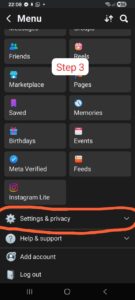
If you’re using the Facebook mobile app, follow these steps:
- Open the Facebook app.
- Tap your profile menu.
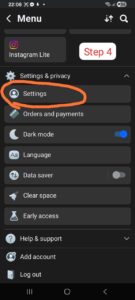
- Select Settings & Privacy.
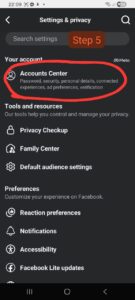
- Open Settings.
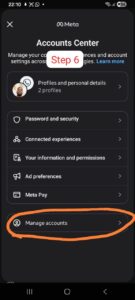
- Go to Accounts Center.
- Select Personal Details.
- Tap Account Ownership and Control.
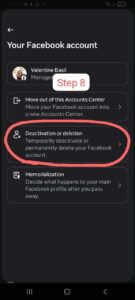
- Select Deactivation or Deletion.
- Choose your Facebook account.
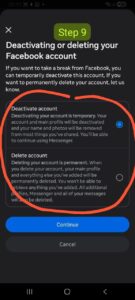
- Select Delete Account.
- Follow the on-screen confirmation prompts.
Facebook may ask you to verify your password before completing the request.


How to Delete Facebook Account on a Computer
If you prefer using a desktop browser, the process is very similar.
- Sign in to Facebook.
- Click your profile picture.
- Open Settings & Privacy.
- Choose Settings.
- Open Accounts Center.
- Select Personal Details.
- Choose Account Ownership and Control.
- Click Deactivation or Deletion.
- Select your account.
- Choose Delete Account.
- Confirm your decision.
The interface may vary slightly depending on updates released by Meta, but the overall process remains largely the same.
For official instructions, visit Meta’s Facebook Help Center.

Delete or Deactivate: Which Option Is Better?
Many users searching for how to delete Facebook account aren’t actually looking for permanent removal. In some cases, temporarily deactivating the account may be the better option.
| Delete Account | Deactivate Account |
|---|---|
| Permanently removes your profile. | Temporarily hides your profile. |
| Cannot normally be reversed after the deletion period. | Can be reactivated anytime. |
| Deletes photos, posts, and profile information. | Preserves your content until you return. |
| Best if you no longer plan to use Facebook. | Best if you simply need a break. |
If you’re uncertain, consider deactivating your account first. You can always return later and permanently delete it if you decide Facebook is no longer right for you.
Why Some People Choose to Delete Facebook
People decide to leave Facebook for many different reasons, and there’s no single right choice. Some common motivations include:
- Reducing screen time.
- Improving digital privacy.
- Simplifying online life.
- Managing social media distractions.
- Creating healthier technology habits.
- Using alternative communication platforms.
For example, someone preparing for important exams or launching a business may temporarily reduce social media usage to improve focus and productivity. Others may simply prefer spending more time on messaging apps or professional networks.
How to Download Your Facebook Data Before Deleting Your Account
If you’ve decided that how to delete Facebook account is the right solution for you, downloading your personal information should be your next step. Many users don’t realize how much content they’ve accumulated over the years until it’s gone.
Facebook allows you to request a downloadable archive that may include:
- Your photos and videos
- Posts and comments
- Messenger conversations
- Friend list
- Profile information
- Groups and Pages you’ve managed
- Marketplace activity
- Events you’ve joined
To download your information:
- Open Settings.
- Go to Accounts Center.
- Select Your Information and Permissions.
- Choose Download Your Information.
- Select the Facebook account you want to export.
- Choose the date range, file format, and media quality.
- Submit your request and wait for Facebook to prepare the download.
Depending on the amount of data stored in your account, the archive may take anywhere from a few minutes to several days to become available.
What Happens After You Request Account Deletion?
Many users searching for how to delete Facebook account wonder whether their profile disappears immediately. In most cases, it does not.
After confirming deletion:
- Your account enters a deletion waiting period.
- Your profile becomes inaccessible to other users.
- If you log back in before the grace period ends, you may have the option to cancel the deletion request.
- Once the deletion process is finalized, most of your account data is permanently removed.
Meta notes that some information, such as messages you’ve sent to other users, may remain visible in their inboxes because those messages are also stored in the recipients’ accounts.
The latest account deletion policies are available through the Meta Help Center.
Common Reasons Why People Delete Facebook
Every person’s situation is different, but several reasons consistently appear among users who decide to leave the platform.
Privacy Concerns
Some users prefer limiting the amount of personal information shared across social media platforms.
Reducing Screen Time
Others want fewer distractions so they can spend more time studying, working, exercising, or with family.
Simplifying Digital Life
Managing fewer online accounts can make digital life easier while reducing notification overload.
Professional Changes
Some professionals choose to focus on platforms better suited to networking or business communication.
Whatever your reason, understanding how to delete Facebook account ensures you leave the platform in a way that protects your data and minimizes inconvenience.
Common Problems When Deleting a Facebook Account
Although the process is usually straightforward, some users encounter obstacles. Here are a few common issues and possible solutions.
You Can’t Find the Delete Option
Facebook occasionally updates its interface. If menu locations change, use the search feature within Settings or consult the official Help Center.
You Forgot Your Password
You’ll normally need your password to confirm account deletion. If you’ve forgotten it, reset your password before continuing.
You Signed Up Using Facebook Login
If you’ve used Facebook to access other websites or apps, update those accounts with a different email address before deleting Facebook.
You Manage Business Pages
Assign another administrator to any Facebook Pages you manage to prevent losing access after deletion.
Protect Your Online Accounts Before Leaving Facebook
Deleting Facebook is also a good opportunity to review your broader online security.
Consider taking these additional steps:
- Change passwords on important accounts.
- Enable two-factor authentication where available.
- Update recovery email addresses.
- Review connected third-party applications.
- Remove unused accounts or services.
Good digital security habits are valuable regardless of whether you continue using Facebook or not.
A Practical Example: Imagine Sarah, a freelance graphic designer who had used Facebook for nearly 12 years. She decided to reduce distractions while growing her business and initially searched for how to delete Facebook account.
Before deleting her profile, she downloaded years of family photos, updated several websites that relied on Facebook Login, transferred ownership of a community Page to another administrator, and informed close friends about alternative ways to contact her.
Because she prepared in advance, the transition was smooth, and she avoided losing valuable memories or access to important online services.
Although every situation is different, planning ahead can make the process much easier.
Keeping Your Other Devices Running Smoothly
Many people who simplify their digital lives also take the opportunity to improve the performance of the devices they use every day.
If your computer has become sluggish, our guide on Why Is My Computer So Slow? 10 Common Causes and Proven Ways to Speed It Up explains practical ways to identify common performance issues and improve responsiveness.
Likewise, if you use an iPhone, regularly updating your applications helps improve security and stability. Our article on How to Update iPhone Apps: A Complete Step-by-Step Guide walks you through the process.
Is Deleting Facebook the Right Decision?
There isn’t a universal answer. For some people, deleting Facebook provides greater peace of mind and helps reduce unnecessary distractions. For others, the platform remains a valuable way to stay connected with family, local communities, or professional groups.
Before making your final decision, ask yourself:
- Will I lose access to important contacts?
- Have I saved the information I want to keep?
- Do I rely on Facebook Login for other services?
- Would temporary deactivation better suit my needs?
Taking a few extra minutes to answer these questions can help you avoid unexpected problems later.
Frequently Asked Questions on how to delete Facebook account
How to delete Facebook account permanently?
If you’re wondering how to delete Facebook account permanently, open Settings, go to Accounts Center, select Personal Details, then choose Account Ownership and Control. From there, select Deactivation or Deletion, choose your account, and confirm Delete Account. Meta may ask you to verify your password before processing the request.
Can I recover my Facebook account after requesting deletion?
Yes—but only during Facebook’s deletion grace period. If you sign back into your account before the deletion is finalized, you can usually cancel the request. Once the deletion process is complete, your account and most associated data cannot be recovered.
Will deleting Facebook also delete Messenger?
Yes. Since Messenger is linked to your Facebook account, permanently deleting your Facebook profile will also remove access to Messenger associated with that account. If you rely on Messenger to stay in touch with family, friends, or colleagues, consider notifying them before deleting your account.
What happens to my photos and videos?
Your photos, videos, posts, and most other content are scheduled for permanent removal after the deletion process is complete. This is why downloading your Facebook information beforehand is strongly recommended.
What’s the difference between deleting and deactivating Facebook?
Deactivation temporarily hides your profile while preserving your information, allowing you to return whenever you choose. Permanent deletion removes your account and most of its associated data after the deletion period ends.
Do I need to cancel Facebook Login on other apps?
Yes. If you’ve used Facebook to sign in to other apps or websites, switch those accounts to another login method before deleting Facebook. This helps prevent losing access to services you still use.
How long does Facebook take to delete an account?
The deletion request usually begins immediately, but complete removal may take additional time as Meta processes the account and associated data. Current timelines are explained in the official Meta Help Center.
Is deleting Facebook better than simply taking a break?
That depends on your goals. If you’re unsure whether you’ll return, temporarily deactivating your account may be the better option. If you’re confident you no longer want to use Facebook, permanent deletion is the more appropriate choice.
Best Practices Before Leaving Facebook
Even after learning how to delete Facebook account, it’s worth taking one final look at your digital footprint before completing the process.
A simple checklist can help you avoid common mistakes:
- Download a copy of your Facebook data.
- Save photos or videos you want to keep.
- Transfer ownership of any Pages you manage.
- Update websites and apps that use Facebook Login.
- Inform close contacts of alternative ways to reach you.
- Review your privacy and security settings on other online accounts.
Completing these steps takes only a short time but can prevent unnecessary frustration later.
Final Thoughts on how to delete Facebook account
Learning how to delete Facebook account is about more than following a series of menu options. It’s about making an informed decision based on your personal needs, online habits, and long-term digital goals.
For some people, deleting Facebook helps reduce distractions and simplify everyday life. Others may choose to deactivate their accounts instead, keeping the option to return in the future. Neither decision is inherently right or wrong—the best choice depends on how you use the platform.
Whatever you decide, taking time to download your information, review connected apps, and understand the consequences of permanent deletion will make the process much smoother.
For the latest guidance on account management, privacy settings, and deletion policies, always refer to the official Meta Help Center, as Facebook occasionally updates its interface and account options.
Conclusion
Understanding how to delete Facebook account gives you complete control over your online presence. Whether your motivation is improving privacy, reducing screen time, simplifying your digital life, or starting fresh, preparing beforehand is the key to a smooth transition.
Remember to back up important information, review connected services, and consider whether temporary deactivation better matches your needs before choosing permanent deletion.
We hope this guide has answered your questions and helped you make an informed decision. If you found this article helpful, consider sharing it with friends or family who may also be looking for a clear, step-by-step explanation of how to delete a Facebook account safely.